 Purgely
Clean your PC without the fear of breaking it.
Purgely removes programs completely, clears what they leave behind, gets rid of bloatware and Windows ads, and keeps programs and drivers up to date. Every item explains itself, and almost everything can be undone.
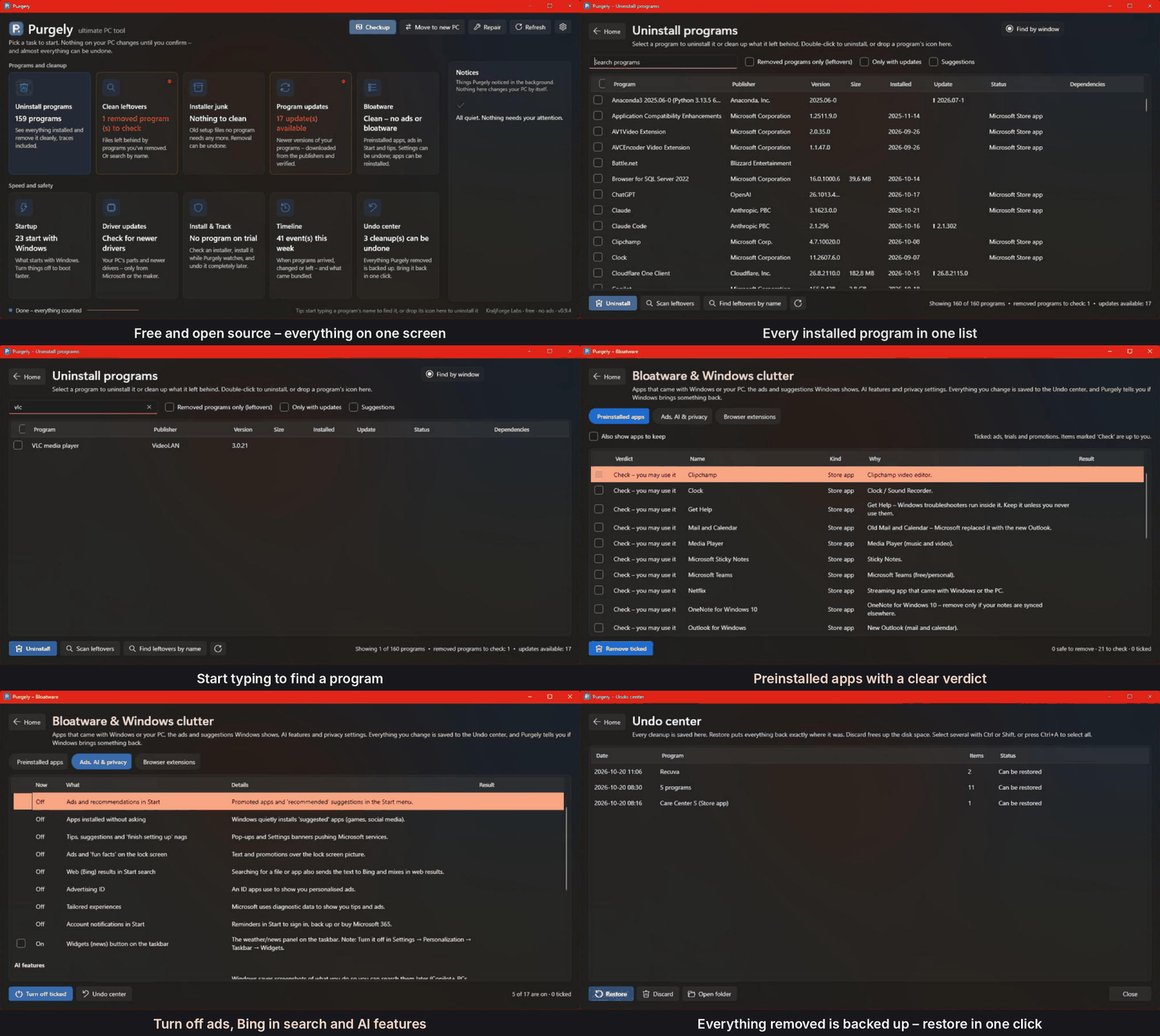
One tool instead of five
Uninstaller, cleaner, debloater, updater and startup manager – built around one idea: understand what a file or setting is before touching it.
Uninstall completely
Programs, Store apps and portable apps, even many at once and quietly where possible. Then one scan finds what they left behind.
Leftovers, found properly
Folders on every drive, registry, services, tasks, startup entries, right-click menus, file types, firewall rules and PATH.
Bloatware, ads & AI
Preinstalled apps with a clear verdict, ads in Start and on the lock screen, Recall and Copilot switches, browser extensions.
Updates you can trust
Programs through Windows Package Manager. Drivers: signed only, and only from Microsoft or your PC's maker. Never from driver sites.
Faster start-up
See what starts with Windows and how heavy it is. Turn off or delay items – Purgely only optimizes what it knows is safe.
Undo center
Before anything is removed, it's backed up on the same drive, so even big games are quick. One click puts it back.
Safe by default
People click whatever a cleaner recommends. So Purgely only ticks what it can prove, and tells you in words how sure it is.
- Never removes your own files, or anything another program still uses
- Weak evidence (only a matching name) is offered, never ticked
- Never follows links out of a folder, never deletes structural Windows keys
- Backs up first and verifies the copy, then removes
- Every release is built by GitHub Actions with tests and a safety audit
Get started in a minute
Purgely is a single file. Nothing is installed, nothing runs in the background.
Download
Get Purgely.exe from Releases – one file, nothing to install, no .NET needed. SHA256SUMS.txt lets you check it, and VirusTotal shows it was scanned by 68 antivirus engines and none flagged it.
Start it
Windows asks for administrator rights. During the beta, Windows may warn about an unknown app: click More info → Run anyway.
Run Checkup
One look at the whole PC. Purgely fixes only what it's sure about, and you can undo it.
Releases are not code-signed yet. Each one is built by GitHub Actions from the public source and comes with SHA256SUMS.txt, so you can check your download (Get-FileHash .\Purgely.exe). More about this.
Testing the beta? What to try and how to report it.